
This post was put together with help from the excellent comms & media team at Coefficient Giving. You can read the (identical) version on CG’s website here.
Hello! I’m Chris Webster, Coefficient Giving’s AI Enablement Lead, a role that didn’t exist until just a few months ago.
We’re a relatively small team trying to tackle the world’s biggest problems. Our staff’s time is a key bottleneck, so when AI tools got good enough to meaningfully speed up knowledge work, we invested in figuring out how to use them well. I’ve taken this on as my full-time job: training staff, implementing new tools, and building workflows.
In this post, I want to share what we’ve learned so far as we’ve integrated AI into our work. I’ll share how we think about AI as an organization, what our team has built, and specific resources I’ve written to help our staff. I hope other organizations can take our learnings and apply them to realize some of the productivity gains we’ve seen.
A brief history of AI becoming useful
Several years ago, when LLM tools were first released to the public, they weren’t much more than fun toys. They could finish your poem (if you didn’t care about rhyming), or give you a pizza recipe (just add some glue to the cheese!), or make you an image of an otter on an airplane…

…as long as you were trying to make something for a Lovecraft novel. It was easy to see these results, laugh at them, call LLMs “stochastic parrots,” and then move on.
However, “The Scaling Hypothesis” has held true so far, and when AI companies put more effort and compute into training LLMs, they got much, much more powerful. This increased intelligence, combined with better scaffolding (like Claude Code or ChatGPT Codex), has led to AI tools becoming meaningfully useful for everyday knowledge work in the last 12 months.
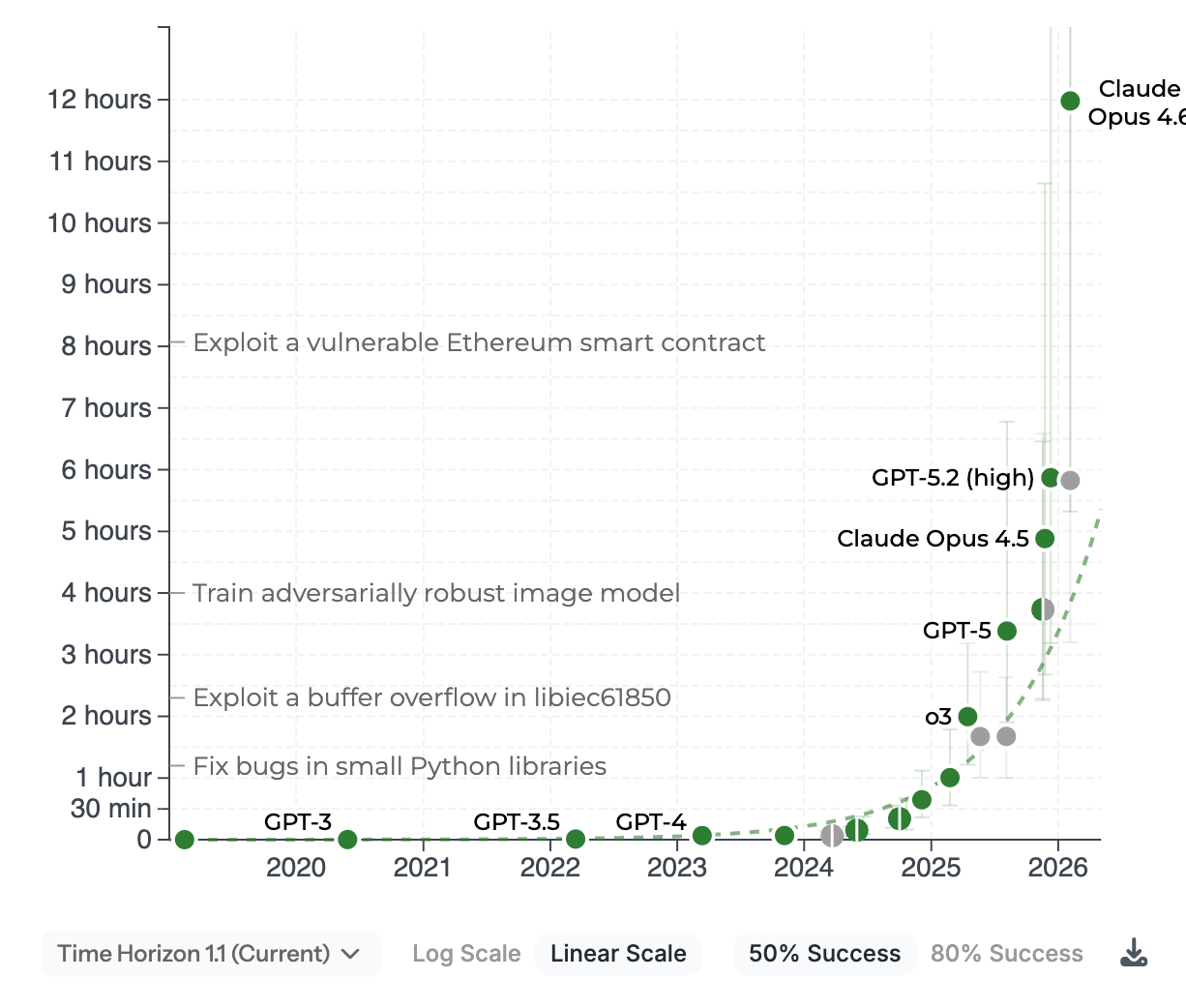
Where AI shines and falls short
AIs can now connect directly to the tools we use every day, keep us organized, and suggest ways we can improve. They’re good at brainstorming, giving feedback, and doing repetitive tasks quickly. AIs can handle much of the busywork that typically takes humans hours per week, and enable our team to do more with less. We often connect AI models to our data sources with MCPs, letting us easily pull in context from Google Drive, Notion, and more. This knowledge helps AI systems provide more insightful takes and makes them closer to a seasoned coworker than a fresh intern.
While we’ve found great success in having AI interact with tools and synthesize data, it’s still quite poor at writing serviceable prose. For example, I tried making this blog post with AI, and the output was so bad that I opted to start over. AI tools write with an uncanny, sales-y, “slop” quality that’s hard to train out of them. I’ve found that the poor-quality output from a seemingly natural use case — writing — can lead to staff bouncing off AI when trying it. It’s therefore important to acknowledge this limitation when pitching teams to use more AI.
In addition, we cannot fully trust AIs in all situations. AIs hallucinate less than they used to, but they can still get confused or lack important context. Sometimes trying to get an AI to do a task takes longer than just doing the task yourself, and knowing when to take over is a difficult skill. AI can also make it feel like you’re working more quickly, when you’re actually just writing more text without accomplishing anything useful.
How I’ve helped our team use AI better
First, I wanted to make sure that all staff were familiar with our policies and advice on how to use AI tools. To do this, I wrote a comprehensive guide for our team, covering what tools our IT team has approved, what each is good at, and how to get started. While much of the advice is now out of date, the main takeaway for other organizations is that you should have a document like this for your staff. Teams need to know what they can use AI for, and which tools they’re allowed to use.
Relatedly, I think it’s crucial for someone at your organization to be the DRI — the Directly Responsible Individual — for using AI effectively. It doesn’t have to be a full-time job, but someone should be responsible for managing your AI policies and helping staff set up AI tools.
Besides written guides, I’ve also found that 1-1 chats are among the highest-leverage ways to help people use AI more effectively. Often, folks know that they should set up AI tools and connect them to their data, but the task feels aversive and turns into an “ugh field.”
Further, many people struggle to carve out time to try AI. By putting a meeting on their calendar for just 30 minutes, I can help unblock people and give them new things to try. These 1-1 chats have also helped me understand our team’s workflows and get a nitty-gritty sense of where AI is helping (or hurting) their work. I’ve had great success with this method across our organization, and heartily endorse it for anyone else trying to enable AI use.
Another tool we’ve used is a simple #using-ai Slack channel. It has been great at getting our team to ask questions and share wins. This channel should have a low bar for new posts, with some people just saying “hey, I tried AI for this and it didn’t work, any ideas on how to make it better?”
The channel has encouraged people to try new things and explore tools that they otherwise may have missed. We’ve also hooked up a Notion Agent that logs useful posts to a searchable database, making it easy for others to find examples of what to try or emulate.
Tools our team has built
With those patterns in mind, I wanted to show off some of the stuff our team has built to get their work done faster.
Abhi’s “Grant Copilot” plugin
Abhi Kumar, on our Farm Animal Welfare team, built a Claude plugin to assist with every step of the grantmaking process. This is a set of custom instructions and commands that Claude uses to gather information about a grant, generate draft writeups, and help the grantmaker prep for their team lead’s review.
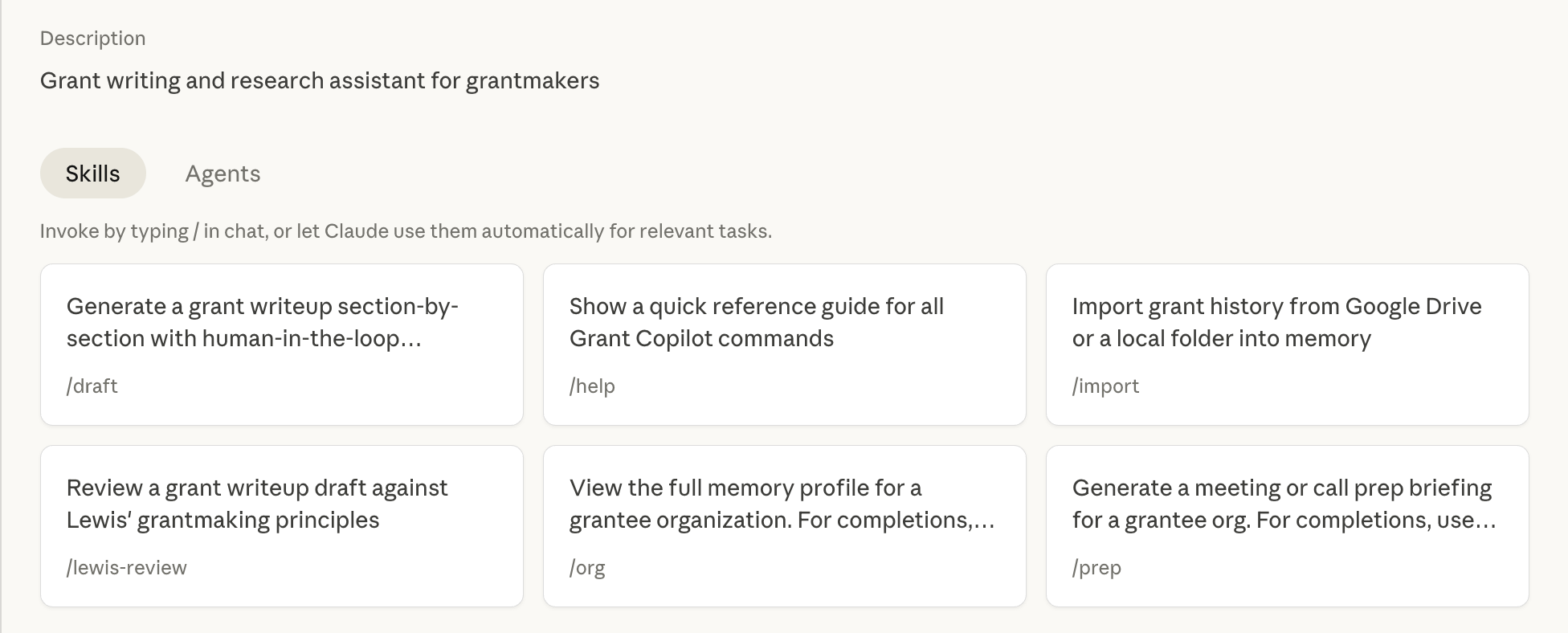
Here’s me using it for a fictional grantee I had a separate Claude make, Chris Saves The Animals (which I think should be given lots of money).
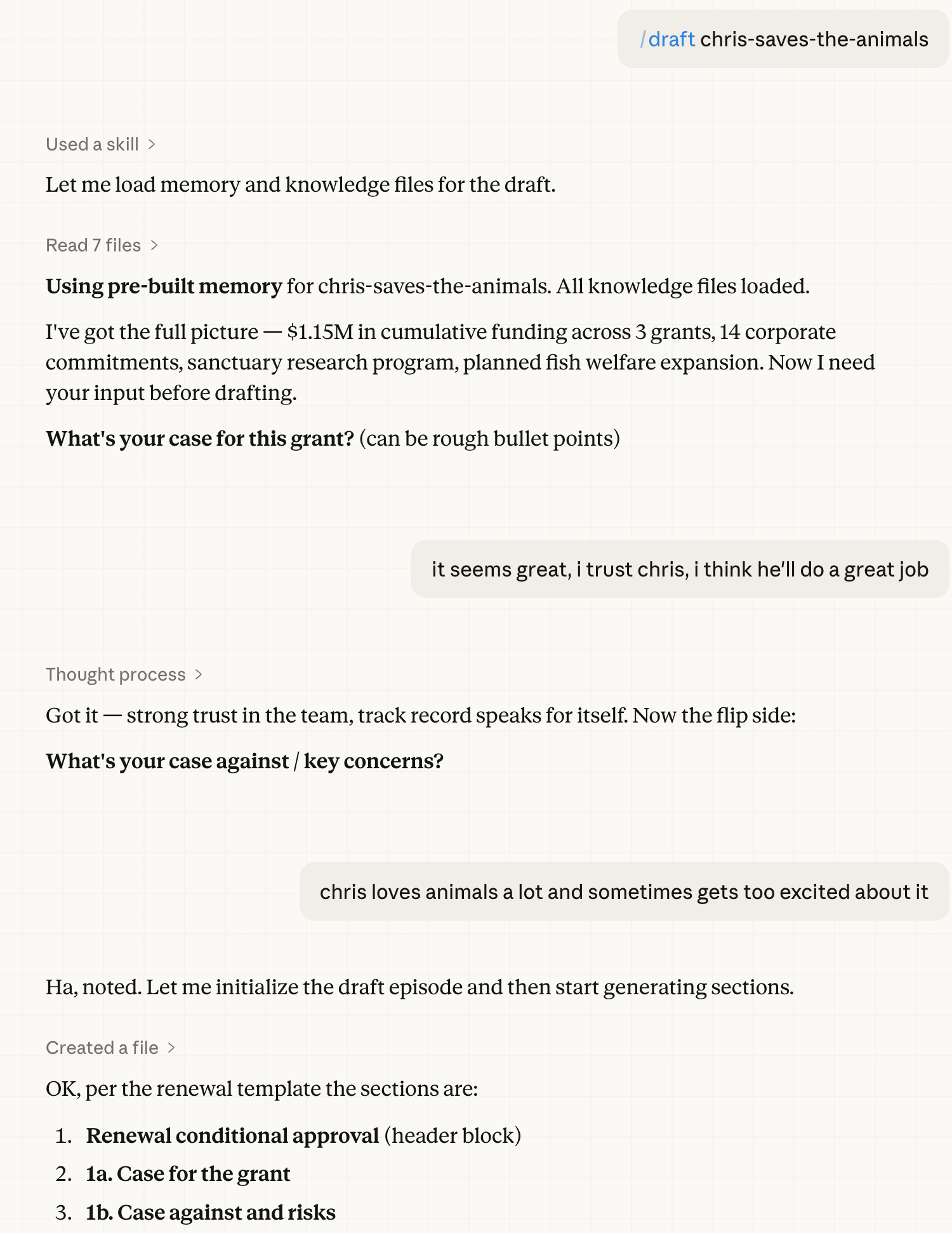
This tool makes it trivial to have Claude Cowork or Claude Code spin up many parallel agents to conduct research and gather data, tasks that normally take hours. It lets the grantmaker focus on important decision-making, rather than information collection.
Dylan’s BOTEC generator
At Coefficient, we love a good Back-of-the-Envelope Calculation (BOTEC). They help us calibrate and quantify ideas, so we can get a rough sense of the scope or cost effectiveness of a grant. BOTECs often take a lot of time and manual effort, and so Dylan Matthews built a web app that uses AI to generate a BOTEC from a grant idea. An example output is here:
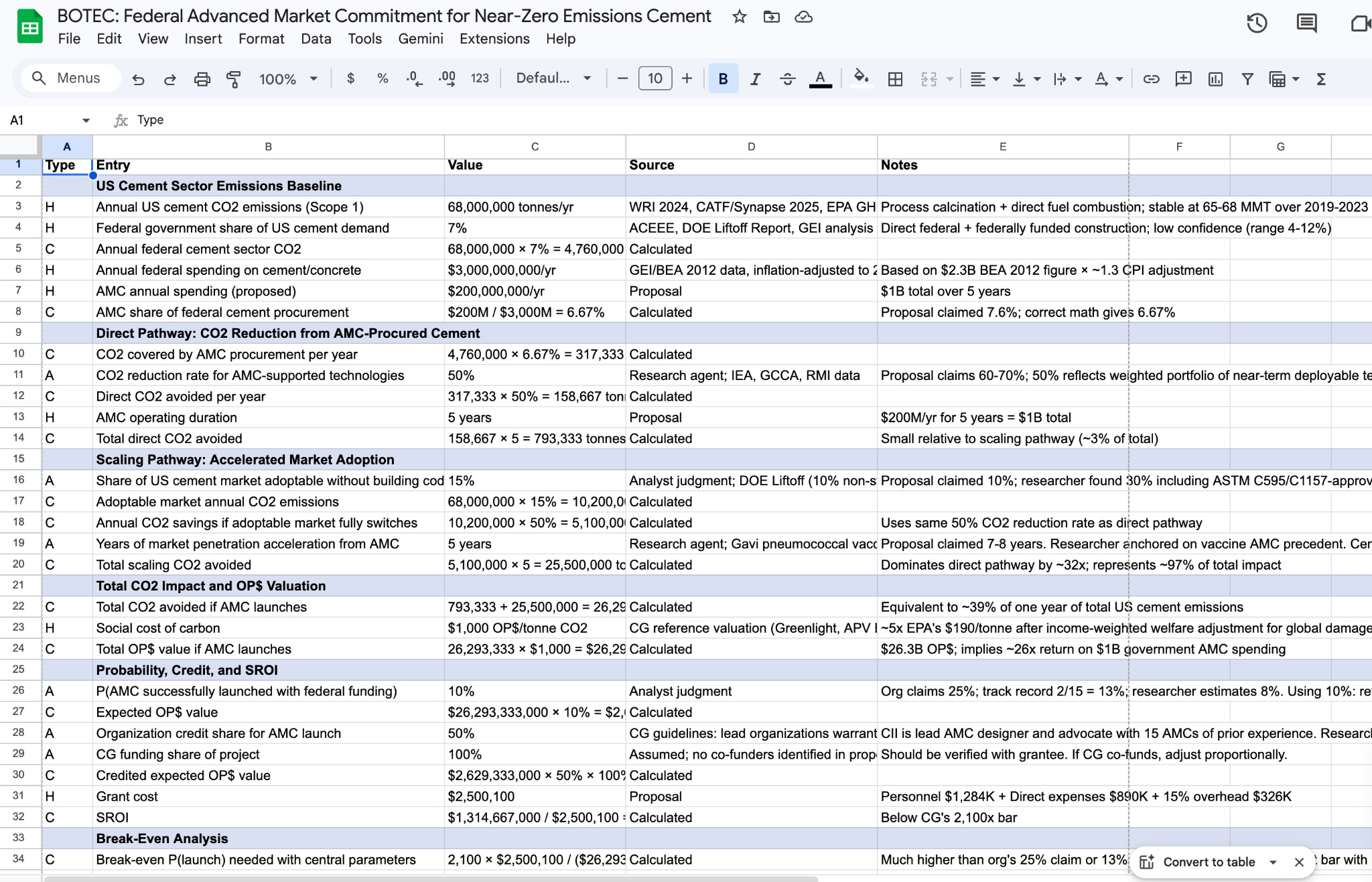
Of course, this output isn’t perfect, and a grant investigator will need to review. But it’s a much quicker way to get started, and lowering the friction to start tasks can lead to big speedups.
Damon’s research with teams of subagents
Damon Binder is a researcher on our biosecurity team and holds the record for using the most tokens per month at Coefficient Giving. He uses Claude Code with many subagents to put together detailed research reports for his team. He reports a 5–10x speedup in his work since he’s set up his full workflow. You can read his full description of his work here.
This is just the start
The above examples are still nascent, and we’re excited (and, yes, more than a little nervous) about what’s coming next. Our staff are just starting to explore fully integrating these tools into our workflows, and I believe that our jobs will increasingly shift to managing AIs to do much of our work. I predict that within 12 months, we will have set up LLM agents with their own computing systems and Coefficient Giving accounts that we’re able to interface with like a remote coworker.
But we do need to be thoughtful as we explore these new tools. We want to make sure adoption really is helping our work — that we’re not just convincing ourselves we’re moving faster when we’re actually spending a long time automating something that could have been done in a few minutes. We also need to continue thinking for ourselves, and to use our own writing as a tool to think deeply. We’re still figuring out how to strike the right balance (and that’s okay!).
Overall, it’s been very worthwhile for us to take AI enablement seriously and invest time in getting better at AI tools. We expect to see even more benefits in the coming years.
If you’re doing similar AI enablement work at your organization, I’d love to hear from you. Please reach out to me at chris[.]webster[@]coefficientgiving.org.